Timber roof trusses on a home under construction
Request a Demo

Software for homebuilders

Built inside a homebuilder. Proven on over 3,000 builds.

STICKS started as custom software for one working builder. Now other builders run their estimating, purchasing, change orders, scheduling and warranty on it too.

What a builder told us

“STICKS software helped our company scale in an organized and efficient way... would definitely recommend to builders looking to make their life easier.”
Don Tolsma, President, Timber Haus Developments
Read the Timber Haus case study (PDF)
STICKS screen: one job in STICKS, showing its purchasing, change orders and service in one place
3,000+builds managed on STICKS
442%Timber Haus sales growth in year one
175%Timber Haus average yearly revenue growth over four years

One platform

The problems owners bring us, and how STICKS handles them

Most builders come to us wanting to grow, get organized or cut costs. Here is what that looks like day to day.

Estimating

Know your margin before you commit to a price

Build purchase order templates once and they feed the estimate for every model and elevation. When a buyer asks what a home will cost, your team can price it, save it and start the sale from it.

  • Item totals, estimated price and margin for each model
  • Price estimates with land, house, additions and taxes
  • Saved pricing updates when prices change
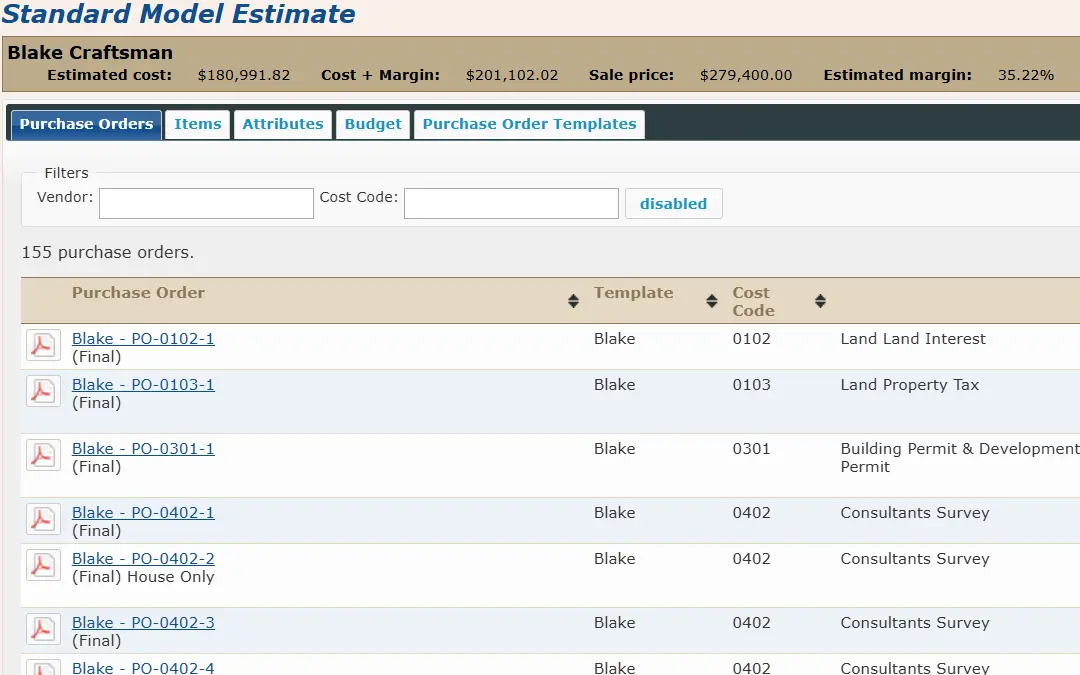
STICKS screen: Standard model price breakdown

Purchasing

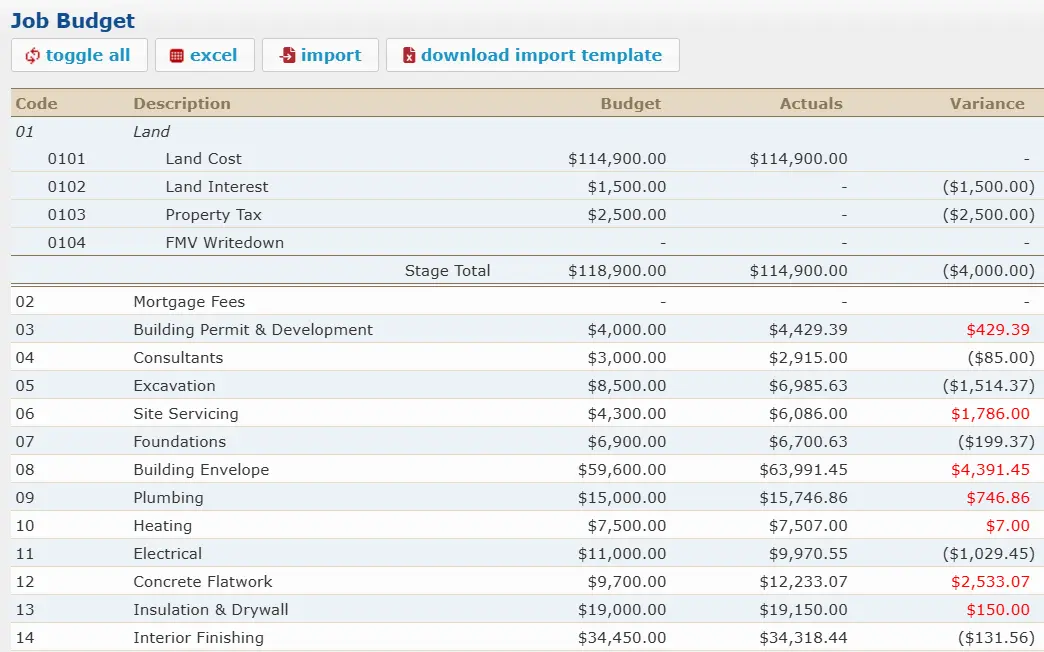
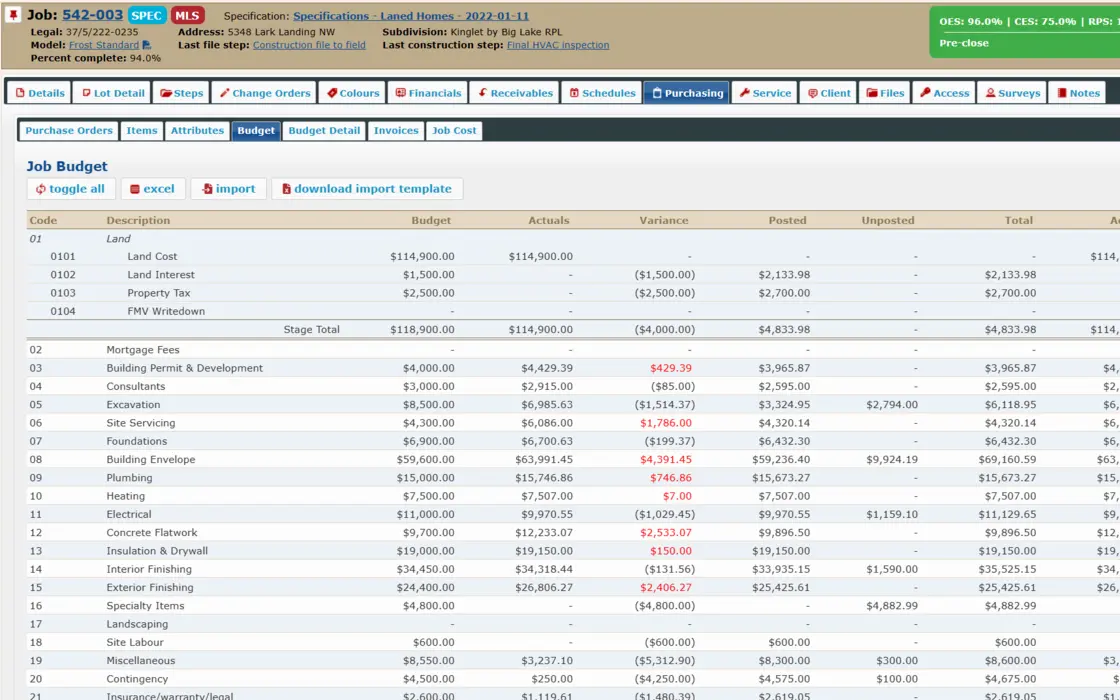
Stop typing invoices and see costs against budget

Purchase orders draw on your vendors’ pricebook and count against the job budget. Invoices e-mailed in are read automatically, and anything that fails a check goes to a person to finish.

  • Budget against actual cost on every job, in real time
  • Invoices read automatically every 15 minutes
  • Invoices flow to QuickBooks Online
STICKS screen: Job purchasing tab, budget against actual

Change Orders

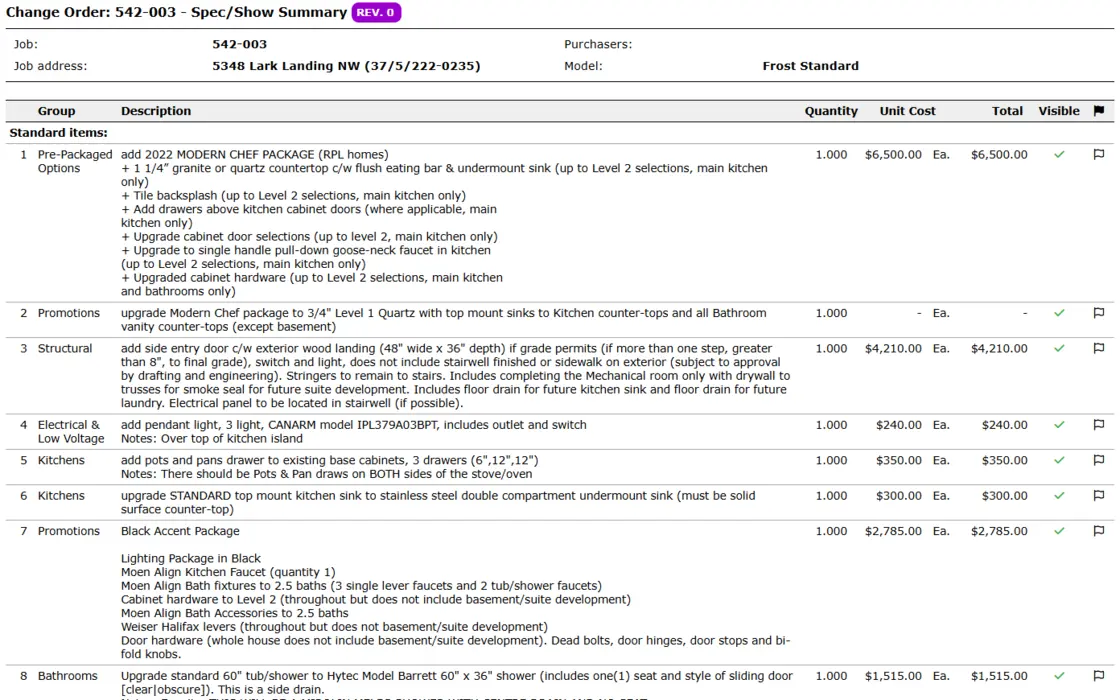
Keep every change numbered, priced and approved

Each change is recorded on the job with its own number and price. Staff pick from a catalogue of standard items or write a custom one, and buyers see a clean, grouped document.

  • Catalogue of standard change order items
  • Cancelled items credited to the buyer
  • A report of what is still unapproved
STICKS screen: Change order on a job

Scheduling

See where every job stands

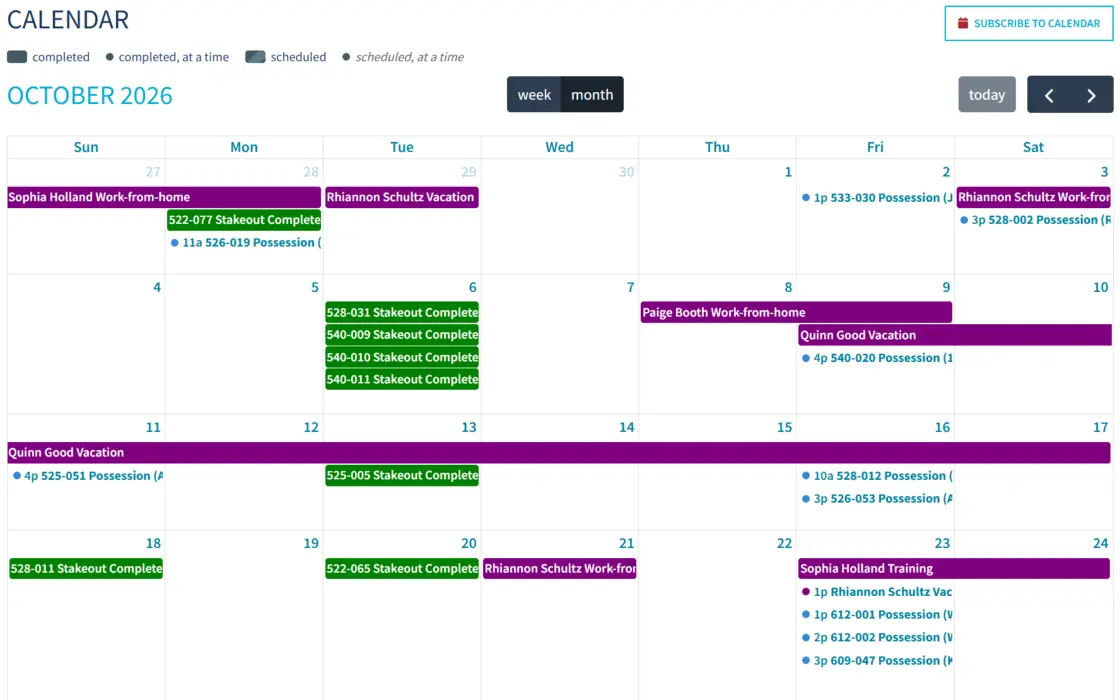
Every job moves through the same steps from acceptance to possession, with separate lists for the office and the site. Key steps appear on the calendar, and leadership can compare planned starts against the current forecast.

  • File and construction steps on every job
  • Shared calendar of key steps
  • Original and revised construction starts, side by side
STICKS screen: Calendar of possessions and stakeouts by job

Service & Warranty

Close out deficiencies before they become complaints

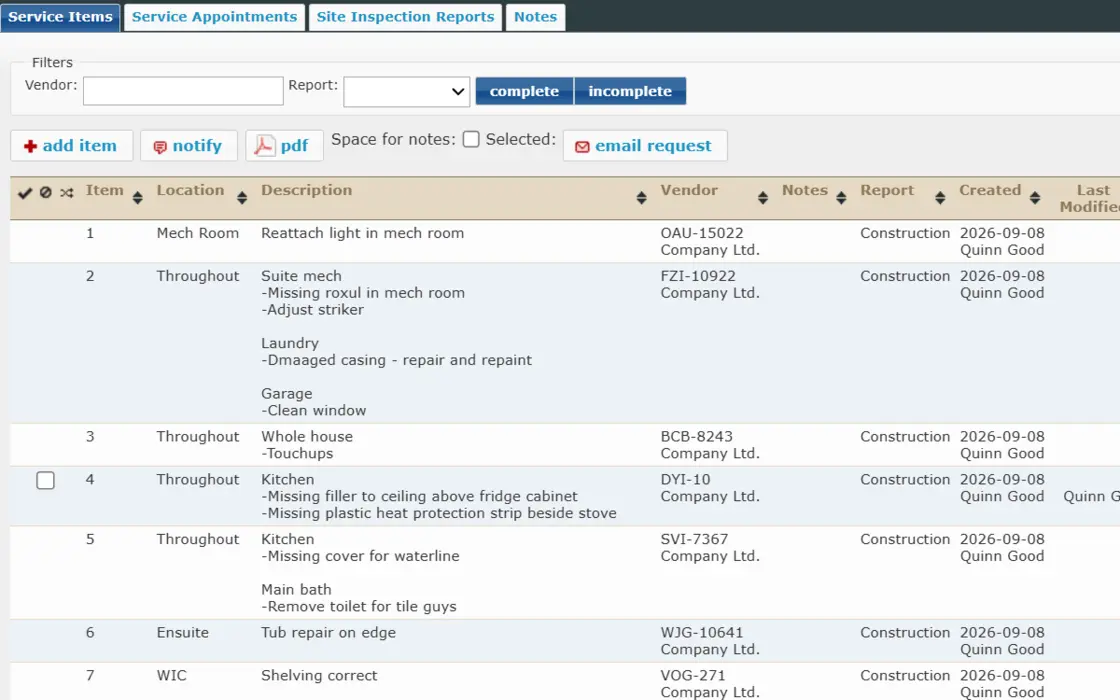
Track each deficiency and warranty item after possession, assigned to the responsible trade. Group items into appointments, notify vendors by e-mail and run site inspections that can be signed off.

  • Open items by job, vendor and location
  • Appointments such as a 30-day warranty visit
  • Inspection checklists exported to PDF
STICKS screen: Open service items on a job

Sales & Land

Get deals off desks and into one place

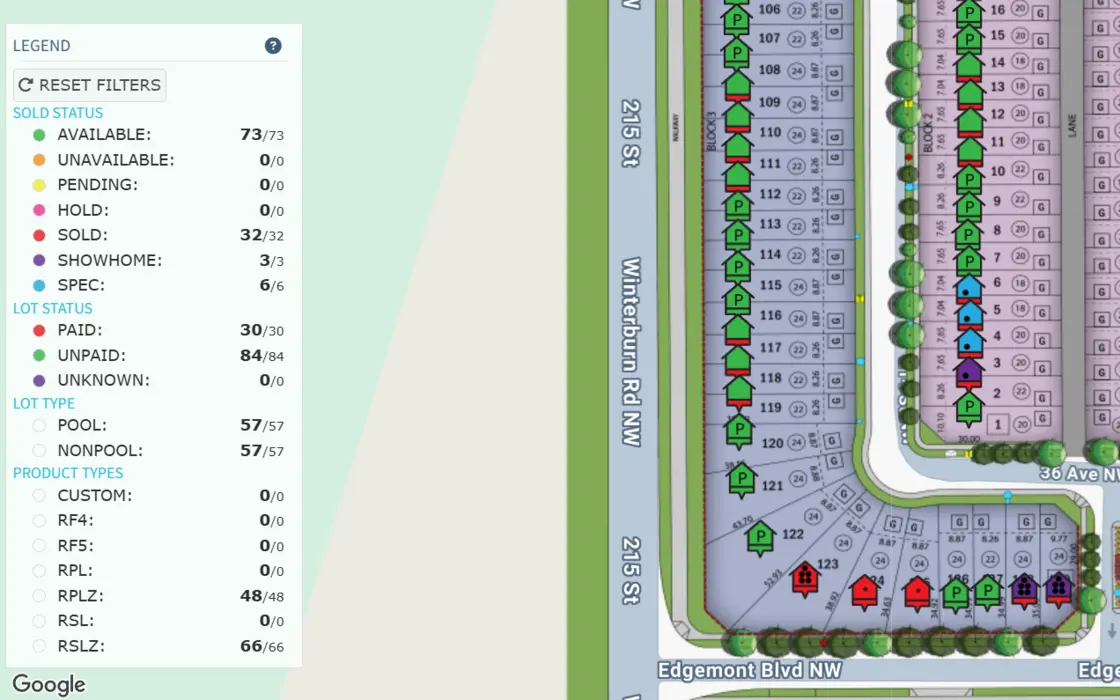
Write agreements with real-time pricing, send them for signature through DocuSign and keep every contract where the whole team can find it. A Google Maps view shows your lots by status.

  • Agreements, approvals and e-signature
  • Lot holds for prospective buyers
  • Colour-coded map of all your lots
STICKS screen: Lot map colour-coded by status

Our story

Software that had to work for a real builder first

STICKS began as custom software for Lincolnberg, a working homebuilder. It wasn’t designed from the outside looking in. It was shaped by the people writing the sales agreements, issuing the purchase orders and handling the warranty calls.

Then people started taking it with them. One of our customers found us because a former Lincolnberg employee who had used STICKS recommended it. That is still how we think about the product: it should be good enough that the people using it every day would ask for it again.

Lincolnberg team members in navy jackets with the company’s red heart logo

Products

Everything you need and nothing you don’t

STICKS.ERP

Run the business from land and sales through purchasing, job costing, service and warranty.

STICKS.CRM

Manage leads and sales opportunities, and attach pricing to the buyers you are working with.

Client Care

Keep buyers informed about their home, so your team takes fewer “where are we at?” calls.

Builders who have built with STICKS

  • Challenger Homes
  • The Gardens in Aspen Trails
  • Timber Haus Developments
  • Waynew Properties
  • Lincolnberg

Works with the tools you already use

  • Customer Insight
  • Docusign
  • Google Workspace
  • Hugging Face
  • Mailchimp
  • Microsoft 365
  • OpenAI
  • OpenHouse.ai
  • Ownest
  • QuickBooks Online
  • Sage 300
  • Text Request
  • Twilio Segment

Common questions

What is STICKS?

STICKS is business software for homebuilders. It brings estimating, sales, land, purchasing, change orders, scheduling, job costing, service and warranty into one web-based platform.

Who is STICKS for?

Homebuilders that have outgrown spreadsheets and disconnected tools. STICKS has managed over 3,000 builds.

Does STICKS work with QuickBooks?

Yes. STICKS integrates with QuickBooks Online, and vendor invoices are sent to it from STICKS. It also connects with tools including Sage 300, DocuSign, Microsoft 365 and Google Workspace.

Does STICKS handle warranty and service work?

Yes. Teams track deficiency and warranty items by job, assign them to trades, schedule service appointments, notify vendors by e-mail and run site inspections.

Where did STICKS come from?

STICKS began as custom software for Lincolnberg, a homebuilder, and is now used by other builders.

See it for yourself

Request a demo

Show us how your business runs today and we’ll show you how it would run on STICKS. Fill out the form and a representative will contact you shortly.

Prefer e-mail? Reach us at info@sticks.cloud.